
How to Get Consistent Output From Claude Every Single Session
The CoWork setup behind reliable AI work

I love when you guys help come up with article ideas. Picking the “perfect” topic to write about can be my bottleneck.
Thanks to Bradley Schnitzer for dropping this comment in my last article:
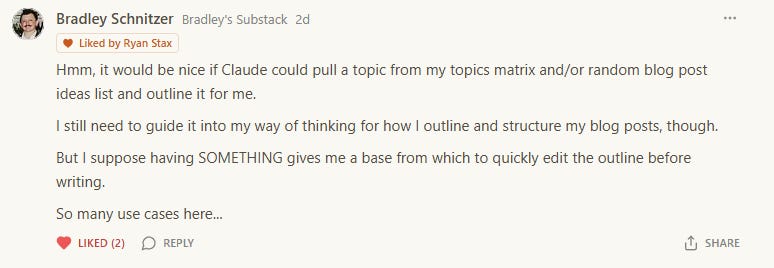
He was closer to the answer than he realized. The frustration he’s describing is the single biggest reason people abandon AI for content work.
You get SOMETHING from the model. But it’s not YOUR something. So you spend 20 minutes editing an outline that took Claude 8 seconds to generate, and by the end you’re wondering if you saved any time at all.
You did, actually. You just don’t have the right system built yet.
Here’s the fix. One file that you set up once and Claude uses it forever.
You’ve Been Blaming the Wrong Thing
It’s that you’ve never written down how you actually think.
You have a style.
You have a structure.
You probably have a preferred way to open, specific moves you run in the middle sections, a certain way you like to title headers, a way you land the ending.
But it lives in your head. So every time you ask Claude for an outline, you’re starting from zero. Claude pulls from its training data, gives you something generic, and you spend the next 20 minutes forcing it back into your shape.
Pick Cowork. Here’s Why.
If you’ve been following this newsletter you know I use both. Claude Code for anything that looks like building software. Cowork for everything else.
For this problem, Cowork wins and it’s not close. Here’s why:
Cowork lives where your writing already lives. Notion, Google Docs, Drive. You don’t need to open a terminal to outline a blog post.
Cowork has Skills. Skills are the exact mechanism for teaching Claude something once so it pulls that knowledge every single time. No re-prompting.
Cowork can read your topics matrix directly. Point it at your Notion database or Google Sheet and it can pull ideas on command.
Claude Code can do all of this too. But it’s overkill. You’d be installing a power tool to hang a picture frame.
If you haven’t set up Cowork yet, stop and do that first. I wrote a full 10-minute setup guide here. Everything below assumes your workspace is already built and Claude has your operator profile, voice rules, and ground rules loaded.
Five Things This File Will Do
A single Skill file that teaches Claude:
Your outline structure (exact sections, in order)
Your hook style (how you open)
Your section-header voice (how you title things)
Your close style (how you land the plane)
What you refuse to do (no rule of three, no em dashes, whatever your rules are)
That file lives in your Cowork workspace. Every time you say “pull a topic from my matrix and outline it,” Cowork reads that file and follows your rules.
The Four-Step Build
Step 1: Feed Cowork Your Five Best Posts
This is the step where most writers quit. They try to describe their own style and end up writing a LinkedIn bio version of themselves. Polished. Aspirational. Completely wrong.
So we’re going to skip that entirely. We’re going to let Cowork read your actual work and tell you what your structure is. Then save the file to your workspace in the same move.
Pick your five highest-performing posts. Not your favorites. Your actual best performers by open rate, clicks, restacks, or comments. The ones your audience voted for with their attention.
Drop them into your Cowork workspace as individual .md files. Then open Cowork and paste this:
Read the five posts in [WHEREVER YOU PUT THEM].

Reverse-engineer my writing structure from them. These are my
best-performing pieces. I want to codify the pattern I'm already
running so you can follow it on future work.

Analyze all five and answer with specifics:

1. HOW DO I OPEN? Questions, scenes, quotes, blunt statements,
   data points? Give me the pattern with word count ranges.

2. WHAT COMES SECOND? Problem statement? Verdict? Context?

3. HOW MANY SECTIONS do I typically use in the body?

4. HOW DO I TITLE SECTION HEADERS? Questions, statements, commands,
   declarations? Average word count?

5. HOW LONG IS THE AVERAGE SECTION?

6. WHAT PATTERNS DO I USE REPEATEDLY? Short paragraphs for emphasis?
   One-sentence paragraphs? Bullets? CAPS? Em dashes?

7. HOW DO I CLOSE? Gut punch? Call to action? Question? Summary?

8. WHAT DO I NEVER DO? Patterns that are conspicuously absent.

Save the output as outline-skill.md in context/. Structure it as
rules you can follow, not as analysis prose.

Don't flatter me. Don't be vague. If the five posts contradict each
other, say so and flag the strongest patterns.
Cowork reads your posts, builds the analysis, writes the file, saves it to your workspace. One command. You now have a skill file sitting in context/ that describes how you actually write.
If the five posts contradict each other significantly, Cowork will flag that. Which means your structure is inconsistent. Fine. Tell it to re-run the analysis on the three strongest posts only.
Step 2: Let Cowork Edit Itself
Cowork’s output from Step 1 is good. But it’s not finished.
The model analyzed what you did, not what you believe. Sometimes those match. Sometimes they don’t. Maybe you’ve been opening with scenes for the last six months but you actually HATE that move and want to stop. Maybe Cowork caught a pattern you use when you’re tired and want to kill.
Read the file it saved. Then tell Cowork to update it.
You don’t need to open the file. You don’t need to find the right section. Just talk:
Read outline-skill.md. Add a section at the bottom called "NEVER DO"
with these rules:
- Never use em dashes
- Never use the phrase "it's not X, it's Y"
- Never end a section with "in conclusion"
- Never use the words: crucial, pivotal, leverage, showcase, robust

Add another section called "ALWAYS DO" with these rules:
- Always state my verdict within the first 200 words
- Always include real names, numbers, and specific examples
- Always end on a concrete action, not a summary
- Always use contractions

Save the updated file.
Cowork opens the file, adds the sections, saves it, and confirms the new version is live. Thirty seconds. The skill file now has your hard rules embedded alongside the analysis of your natural patterns.
This is the move nobody using ChatGPT can make. File-aware AI is a different tool. Use it.
Step 3: Plug In Your Topics Database
Your topics matrix is probably a Notion database or a Google Sheet. Either works.
In Cowork, point Claude at it. Something like: “Look at my Notion database called ‘Topic Matrix,’ pick one topic that hasn’t been written yet, and outline it using outline-skill.md from context/.”
Cowork now has the input (your topic list), the rules (your skill file), and the output target (an outline in your structure). The friction is gone.
Step 4: Let Cowork Improve Itself
First few outputs won’t be perfect. That’s expected. The skill file is a living document.
Here’s where most people would tell you to open the file and manually type in new rules. Don’t. You’re inside Cowork. Claude has file access. Make it do the work.
When Claude outputs something that isn’t quite right, tell it exactly what was wrong and have it update the skill file directly:
That outline ended with a rhetorical question. I never do that in my posts.
Open outline-skill.md and add a new rule under "NEVER DO":
"Never end a section with a rhetorical question."
Save the file.
That’s it. The rule is now permanent. Every future outline reads the updated file before generating.
You can also batch corrections at the end of a session. “Review the three outlines you made today. List every pattern that was off. Update outline-skill.md with the corresponding rules.” Cowork reads its own past outputs, spots the recurring issues, writes the new rules, saves the file. You approve.
After two or three sessions of this, Claude outputs outlines that feel like you wrote them. And the skill file keeps getting sharper in the background without you ever opening it manually.
From 20 Minutes to 3
Before this system: you prompt Claude, get a generic outline, spend 20 minutes restructuring it, then write the post.
After this system: Cowork reads your matrix, pulls a topic, outputs an outline in your exact shape, and you edit for 3 minutes before writing.
The 17-minute difference is real. But the bigger win is that you stop dreading the outline phase. Most writers I talk to say the outline is WHERE they procrastinate. Remove the friction at that stage and the rest of the post writes itself.
Upgrade the Way You Use AI
Everything in this article is free. You can build the outline system yourself and it’ll work. That’s the point of this newsletter.
But the free version of The AI Handbook only shows you the WHAT and the WHY. The frameworks. The thinking. Enough to change how you approach your work forever.
Paid subscribers get the HOW.
$15/month gets you:
Copy-paste prompts I use every day
Complete operator builds with the exact files, folders, and commands
Every past issue with its templates, prompts, and resources
My inbox. I read every reply.
One system from this newsletter saves you 2+ hours a week. That’s 100+ hours a year. You get a new one every week.
At $100/year, that math stops being a question.
Ryan
As long as you are working within the "project" that contains those files
Wow, I just realized you tagged me in this. Thanks for the shoutout and great article!