
How to Use Claude Cowork Better Than 99% of People
The Complete 10-minute Setup.

I cancelled ChatGPT.
I cut the Notion AI subscription. Obsidian. GONE. Gemini sits untouched.
The only tool still open on my computer every single morning is Claude Cowork.
I’m going to show you exactly how I set it up. The full system, the files, the prompts. All of it.
BE WARNED: This is the last AI setup guide you’re going to need. Not because I’m that good at writing tutorials. Because once you build this, you won’t go looking for another tool again. (I say that not, but who knows what will drop next week :)
You’re Probably Still Doing This:
A year ago I was duct-taping four tools together just to get through a normal week. Notion for notes. ChatGPT for drafts. Google Sheets for research links. n8n to move data between all of them. Some days I felt like the AI’s sweaty little meatsuit slowly developing carpal tunnel syndrome… The human API. Copy from here, paste there, reformat, re-explain, repeat.
Most of you are still doing this. And I get it. I did it for a long time.
Then I spent 30 minutes setting up Claude Cowork the way I’m about to show you. And everything changed.
Cowork started writing in my voice. Not “close enough.” My ACTUAL voice. The cadence, the vocabulary, the opinions.
It stopped asking me to re-explain my business every session. It already knew. My clients, my audience and priorities. Every session picked up where context left off.
It connects to my Gmail, my Google Drive, my Notion. It pulls context from the tools I already use and acts on it. No more copying between tabs.
And it runs tasks while I sleep. Every morning, there’s a fresh AI news briefing with content ideas already sitting in my outputs folder. I scheduled it once. It runs every night.
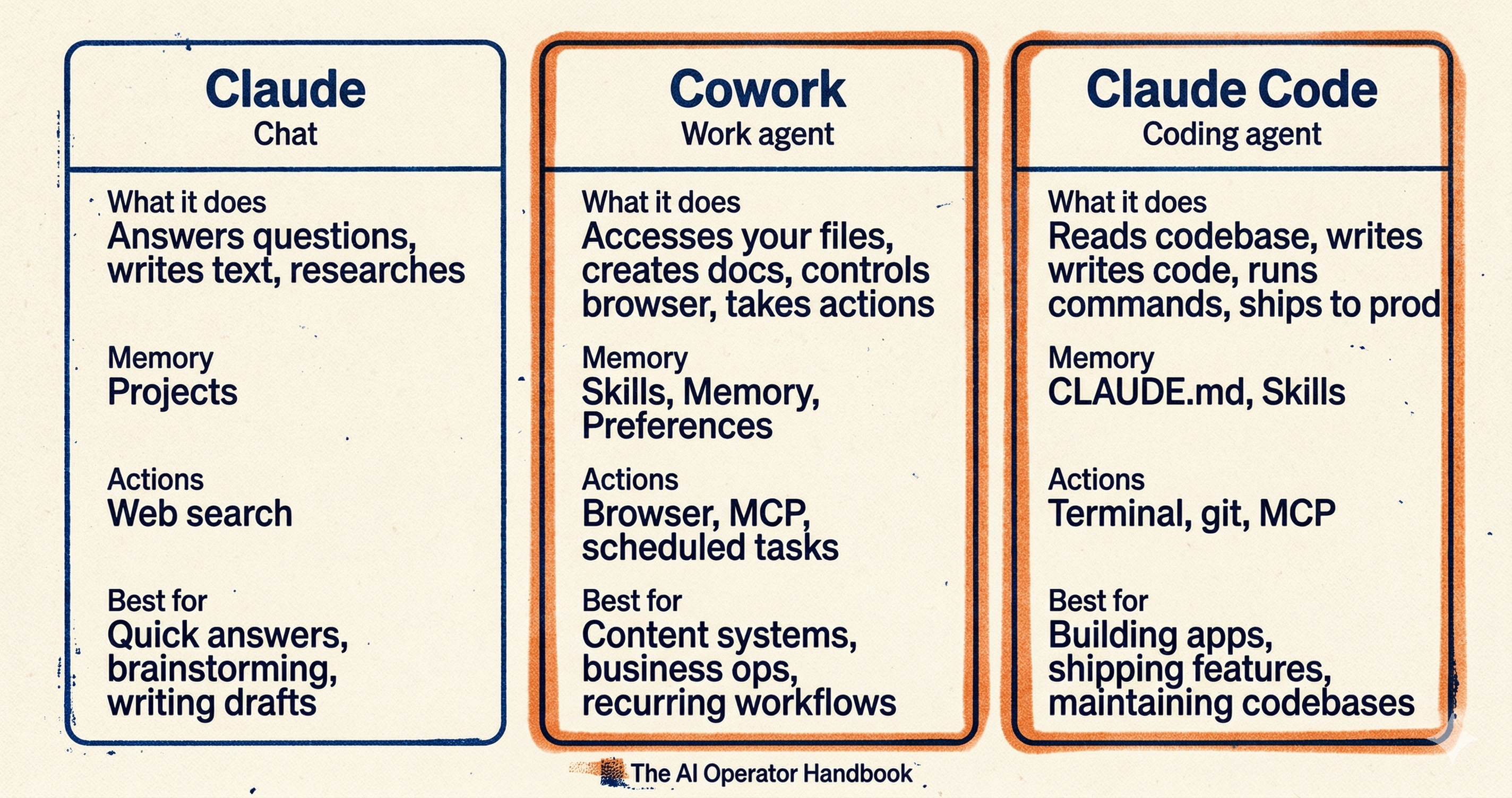
Here’s the problem.
If you don’t set it up RIGHT, none of that happens.
You open Cowork and start typing away. Claude doesn’t know who you are, your business, clients or voice. What are your standards? It has ZERO idea so it guesses. For all you know, you end up with a business plan for a hot yoga llama farm.
You close the tab. Go back to Chat. Assume Cowork was overhyped.
Alex Banks, who writes The Signal newsletter, put it well on a recent piece: Cowork out of the box is mediocre. Cowork properly configured is a different tool entirely. The gap between those two is about 30 minutes of setup.
That’s where 99% of people stop. Right at the gap.
The tool works. It just needs your context.
This article fixes that. Permanently. I’m going to give you the exact folder structure, the exact prompts, and the exact instructions I use. Copy and paste the whole thing. 30 minutes.
Or 10 if you grab the plugin I built... More on that at the end.
Let’s build it.
Step 1: Build the Folder
(PAID SUBSCRIBER? SKIP ALL THESE STEPS, JUMP TO THE END, I HAVE A SPECIAL TOOL SO YOU DON’T NEED TO DO THESE STEPS)
60 seconds. Seriously.
Stop thinking in prompts. Start thinking in workspaces.
Every piece of context Claude needs about you, your business, and your rules is going to live inside files in ONE folder on your computer. You open Cowork, you point it at this folder, and Claude reads those files before doing anything. Every. Single. Session.
No more re-explaining yourself. No more “I’m a consultant who works with...” at the top of every conversation. That’s over.
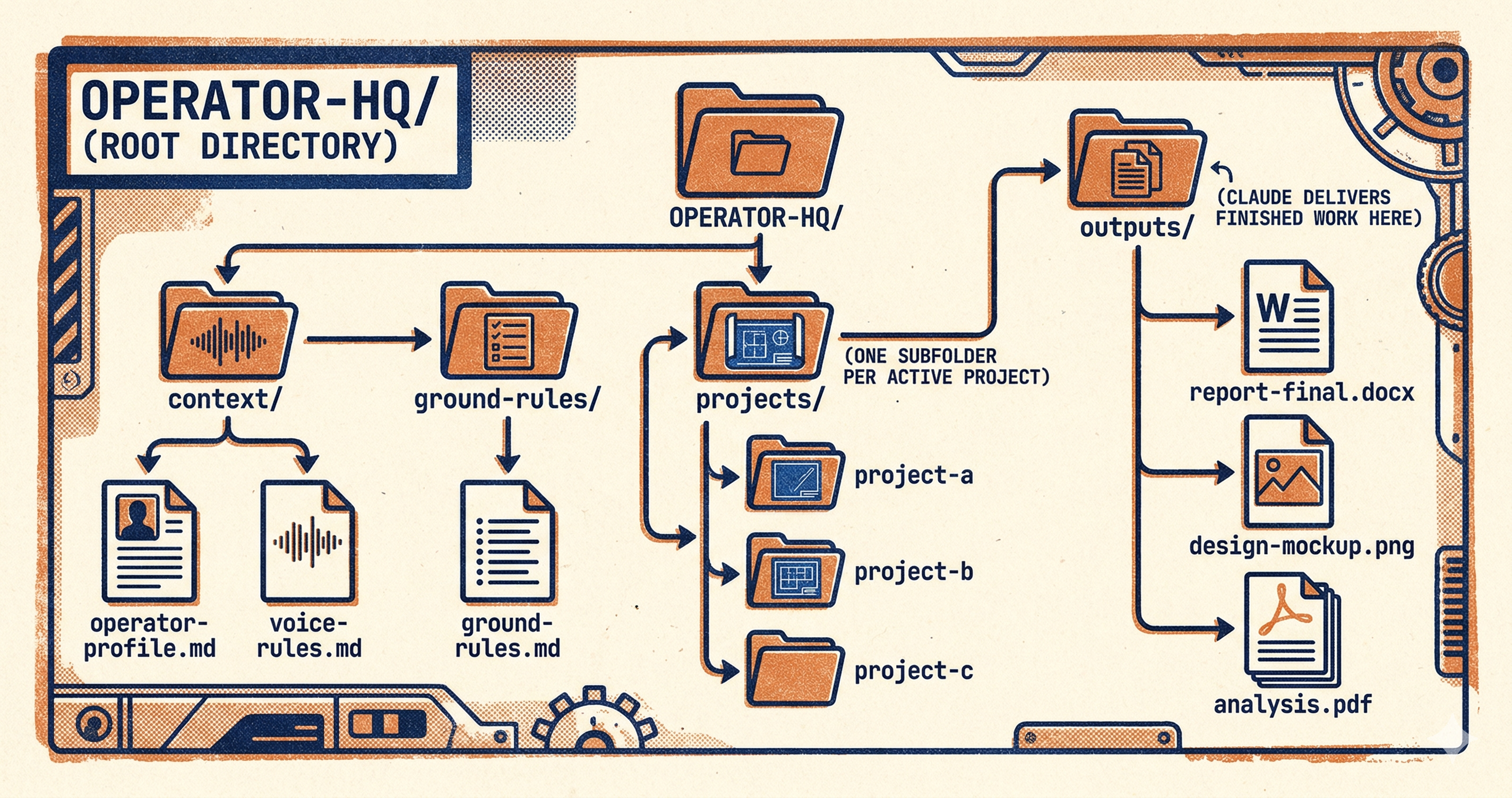
Here’s the structure. Go create this right now. I’ll wait.
OPERATOR-HQ/
├── context/
│   ├── operator-profile.md
│   └── voice-rules.md
├── ground-rules/
│   └── ground-rules.md
├── projects/
│   └── (one subfolder per active project)
└── outputs/
    └── (Claude delivers finished work here)
Four folders.
context/ is the stable stuff. Who you are. How you sound. Doesn’t change often. Maybe once a quarter when your priorities shift.
ground-rules/ is how Claude should behave inside your workspace. When to ask questions. When to just shut up and execute. What it should NEVER assume about your work.
projects/ is the live work. One subfolder per project. Drop your brief in there, any reference material, prior drafts. When you tell Claude to work on that project, it reads the whole subfolder.
outputs/ is where Claude delivers finished work. The ONLY folder Claude writes to. Everything it creates lands here. Named properly. Organized. Ready to send.
DO NOT MISS THIS:
context/ and ground-rules/ are READ-ONLY for Claude. It reads them but never touches them. outputs/ is WRITE-ONLY. Claude delivers work there but doesn’t mess with your existing files. projects/ is read-only unless you specifically tell Claude to edit something inside it.
That separation matters. When you give an AI agent read/write access to your files, you want clear boundaries between what it learns from and what it creates. Period.
Go build the folder. Four subfolders. We’ll fill them next.
Step 2: Build Your Operator Profile
About 10 minutes.
This is the file that turns Claude from a stranger into someone who already sat through your onboarding week.
BUT. Do not write this file yourself.
I know. You’re going to want to open a blank document and start typing. “I’m a business consultant who specializes in...” Don’t. When people write their own context files, they produce LinkedIn bios. Polished. Aspirational. Completely disconnected from how they actually operate at 6 AM on a Tuesday with a half-empty coffee and an email they’ve been ignoring since Friday.
Claude doesn’t need the conference version of you. It needs the real version.
So we’re going to let Claude interview you instead.
Open Claude Chat (not Cowork. Regular Chat). Paste this prompt:
You are going to interview me to build a context file called operator-profile.md.

This file will be used inside Claude Cowork so that every session starts with full context about who I am, what I do, and how I work.

Ask me questions one at a time. Cover these areas:

1. What I do for work (role, business, industry)
2. Who I serve (clients, customers, audience)
3. What I'm building right now (current projects, priorities)
4. How I think through problems (analytical, intuitive, data-first, gut-first)
5. What tools I use daily
6. What "good work" looks like to me
7. What I hate seeing in AI output

Ask 12-15 questions total. One at a time. If my answer is vague, push back and ask for a specific example.

When done, compile everything into a clean markdown file I can save as operator-profile.md.

Do not flatter me. Do not say "great answer." Just ask the next question.
Claude asks. You answer. It pushes back when you’re being vague. It asks for specifics. After about 12 questions, it compiles everything into a clean markdown file that actually captures how you work.
Copy the output. Save it to OPERATOR-HQ/context/operator-profile.md.
Do this once. Revisit it when your business changes or your priorities shift. Maybe once a quarter. Maybe less.
Step 3: Build Your Voice Rules
About 5 minutes.
This is the file most people skip. And then they wonder why Claude sounds like a corporate press release generator.
Every piece of content Claude produces for you will sound like it was written by a robot unless you tell it exactly how YOU sound. What words you use. What words make you cringe. Whether you curse. Whether you use humor or keep it dry. How you structure your thinking.
This is the difference between output you delete and output you publish.
Same process. New Chat session. Paste this:
You are going to interview me to build a voice and style file called voice-rules.md.

This file will be used inside Claude Cowork so that everything it writes sounds like me.

Ask me questions one at a time. Cover these areas:

1. How would you describe your writing tone? (direct, casual, academic, warm, blunt)
2. Show me a paragraph you've written that you're proud of. (I'll paste one)
3. Show me a sentence that sounds nothing like you. (I'll paste one)
4. What words or phrases do you never want to see in your content?
5. Do you use contractions? Slang? Humor? Profanity?
6. How do you feel about bullet points vs. paragraphs?
7. Do you write differently for different audiences? How?
8. What's the worst AI writing habit you've noticed?

Ask 8-10 questions. One at a time. Push back on vague answers.

When done, compile into a markdown file I can save as voice-rules.md.

Include a "never do" section and a "always do" section based on my answers.
Here’s what separates a decent voice file from a great one: REAL SAMPLES.
When Claude asks you to show it writing you’re proud of, don’t describe your style. Paste an actual paragraph. A newsletter you wrote. A client email you nailed. A Substack Note that got 400 restacks. Give it concrete examples and it will pattern-match against the real thing instead of guessing based on adjectives.
Save the output to OPERATOR-HQ/context/voice-rules.md.
Step 4: Build Your Ground Rules
About 5 minutes.
You’ve told Claude who you are. You’ve told it how you sound. Now you need to tell it how to BEHAVE.
Without this file, you get a different Claude every session. Sometimes it asks clarifying questions before starting work. Sometimes it just barrels ahead and builds something you never asked for. Sometimes it reads your context files. Sometimes it decides it already knows enough and skips them entirely.
That inconsistency is what makes people give up on Cowork. They think the tool is unreliable. The tool is fine. It just doesn’t have operating rules.
Last interview. New Chat session. Paste this:
You are going to interview me to build an operating rules file called ground-rules.md.

This file will be used inside Claude Cowork to control how Claude behaves during every session.

Ask me questions one at a time. Cover these areas:

1. Should Claude ask clarifying questions before starting, or just go?
2. When should Claude ask for permission vs. just execute?
3. What should Claude never assume about your work?
4. What file formats do you prefer for deliverables?
5. How detailed should responses be? (concise vs. thorough)
6. What does a "finished" deliverable look like to you?
7. What mistakes has AI made for you in the past that you want to prevent?
8. Are there any topics, tools, or approaches Claude should avoid?

Ask 8-10 questions. One at a time.

When done, compile into a markdown file with clear sections:
- Before every task (what Claude must do first)
- During execution (how Claude should work)
- Delivery (where and how to save output)
- Hard boundaries (what Claude should never do)

Save as ground-rules.md.
Save to OPERATOR-HQ/ground-rules/ground-rules.md.
You now have three files sitting in your workspace. Your operator profile. Your voice rules. Your ground rules.
These three files are the ENTIRE reason your Cowork experience will be different from everyone else’s. They’re the gap between generic output and work that sounds like you built it yourself.
One more step.
Step 5: Paste Your Global Instructions
2 minutes. Copy. Paste. Save.
Global Instructions are the command layer sitting on top of everything.
They’re a persistent set of rules Claude reads BEFORE every Cowork session. Before it opens your files. Before it touches anything. These instructions tell Claude exactly where to look, what to read first, and how to handle your workspace. Without them, Claude might read your files. Might not. Might ask questions. Might guess. You’ve seen this behavior if you’ve used Cowork without setup. It’s inconsistent because there’s no protocol.
This fixes that.
Open Claude Desktop. Go to Settings > Cowork > Edit Global Instructions.
Paste this EXACTLY:
# GLOBAL INSTRUCTIONS

## BEFORE EVERY TASK
1. Read everything in context/. No task starts without this.
2. Read ground-rules/ground-rules.md.
3. If the task relates to a project, read the matching subfolder in projects/.

## FOLDER RULES
Read-only (never create, edit, or delete files here):
- context/
- ground-rules/
- projects/

Write-only (all deliverables go here):
- outputs/

## FILE NAMING
All files you create: project-name_content-type_v1.ext
Examples: newsletter_draft_v1.md, client-proposal_report_v1.docx
Increment version if a file with the same name exists.

## OPERATING RULES
- If the task is unclear, ask questions first. Don't fill gaps with guesses.
- Deliver the work. Skip the commentary unless I ask for it.
- Never delete files anywhere.
Save.
That’s it. You’re done.
Five steps. One folder. Three interviews. One block of instructions pasted into settings. Under 30 minutes total.
Every single Cowork session from this point forward starts with Claude reading your profile, your voice, your rules, and your project files before it writes a word. Your prompts can be two lines long now. The workspace does the heavy lifting.
But before you go run your first task, read this next section. Because I’ve watched people do everything above perfectly and STILL get mediocre results.
The 5 Mistakes That Keep People in the 99%
You built the workspace. Good.
Now here’s what kills it.
1. Giving Cowork the keys to your entire computer.
Good way to nuke your entire file system. Someone reads about Cowork, gets excited, and selects their entire Documents folder. Or their Desktop. Or their home directory. Claude now has read/write access to 14,000 files it doesn’t need and can’t make sense of. If something goes wrong, the blast radius is your entire machine. You built OPERATOR-HQ for a reason. One dedicated folder. Four subfolders inside it. That’s the perimeter. Stay inside it.
2. Writing your context files by hand.
I said it in Step 2 and I’ll say it here again because people STILL do this. They skip the interview prompts, open a blank .md file, and start typing a description of themselves. What comes out is a conference speaker bio. Looks great on a slide. Useless for an AI that needs to understand how you actually make decisions, what frustrates you, and what “finished work” means to you specifically. The interview prompts exist because humans are terrible self-reporters. Use them.
3. Writing 500-word prompts because that’s what ChatGPT trained you to do.
The ChatGPT hangover is real. You spent a year front-loading every single prompt with background information, tone guidance, constraints, formatting rules, examples of what you want, examples of what you don’t want. You had to. ChatGPT didn’t know anything about you. With the workspace you just built, your context files carry all that weight permanently. Your prompts shrink to two sentences. If you’re still writing novels into the prompt box, your context files aren’t pulling their weight. Go back and tighten them up.
The Shortcut
Everything above works. Completely. You can run through all five steps manually and have a fully operational workspace in about 30 minutes.
But I built something faster - one download - 10 minutes later everything is structured.
The Operator Onboarding Plugin is a Cowork plugin that runs one structured interview and generates EVERYTHING for you.
About 10 minutes. You answer 15-18 questions. It does the rest.
It generates operator-profile.md, voice-rules.md, and ground-rules.md. Writes your Global Instructions. Drops everything into the right folders.
Once you install it, Cowork loads the plugin automatically whenever it recognizes a relevant task. You install it once. You forget about it. It just works in the background.
The guide above gives you the full manual setup. Nothing is missing. Nothing is held back. The plugin compresses 30 minutes into 10 and removes the assembly step.
Join as a paid subscriber and get your CoWork setup the fastest way in the next 10 minutes, download below \/
