
Claude Opus 4.8: What You Need to Know
Hype, mostly. Useful upgrade? Yes.

TL;DR: Claude Opus 4.8 is not a leap. Anthropic themselves called it a “modest but tangible improvement,” and they’re right. Three changes matter for normal users: less hallucination on confident-sounding answers, a new effort dial that lets you control how hard Claude thinks before answering, and a much bigger context window that holds long documents without forgetting the start. Same price as Claude 4.7. If you use Claude for real work, flip the switch.
Your feed is on fire again.
Another model dropped. The thumbnail brigade is back with “THIS CHANGES EVERYTHING” and benchmark screenshots you can’t read and a YouTube hype boy telling you how shocked he is from this new release.
Like this guy:

No Alex, it’s not…
I’m not going to do that to you.
If you use Claude for actual work and you just want to know whether this release matters to you, I am going to drop it for you, in plain English.
No benchmarks. No charts. Just what changed and whether you should care.
Here’s the verdict up front: Claude Opus 4.8 is NOT a leap.
Anthropic said so themselves. They called it a “modest but tangible improvement.” When the company that built it is telling you to lower your expectations, believe them.
But “modest” doesn’t mean “useless.”
A few changes fix things you’ve been annoyed by, probably without realizing they were fixable. Those are worth your time.
Let me walk through them.
Claude 4.8 hallucinates less
The internet if full of tales where people got caught submitting fabricated AI hallucinations in their work.
Like the lawyers who were sanctioned for filing legal briefs full of fake AI citations.
You ask Claude something. It hands you a clean, confident answer. Then you go check, and half of it was invented. No warning. No “I’m not sure here.” Just smooth, total fiction delivered like fact, almost as smooth as my 10 year old trying to convince me she wasn’t the one who didn’t put her dishes away.
Anthropic put most of their effort this release into that exact problem. They trained 4.8 to flag when it’s unsure and to stop making claims it can’t back up. Early testers say it owns its uncertainty more and fabricates less.
Is it better? I don’t know yet. Nobody does. I have been trying to break it, but I haven’t come across a) hallucinations or b) it telling me it’s unsure.
A company telling you their model is more honest means nothing until you’ve watched it admit “I’m not certain about this” on a question it would’ve bluffed last month. So test it.
The single biggest reason to distrust AI is that it lies to your face with a straight one. hopefully this fixes that.
The new effort dial: you control how hard Claude thinks
Ever ask Claude to do something dead simple, like reformat a list, and watch it sit there reasoning like you’d asked it to explain the meaning of life?
That was a real complaint about Claude 4.7. It would burn time and tokens deliberating over tasks that needed none of it. Annoying when you’re in a hurry. Worse when you’re paying per token.
Claude 4.8 adds an effort dial.
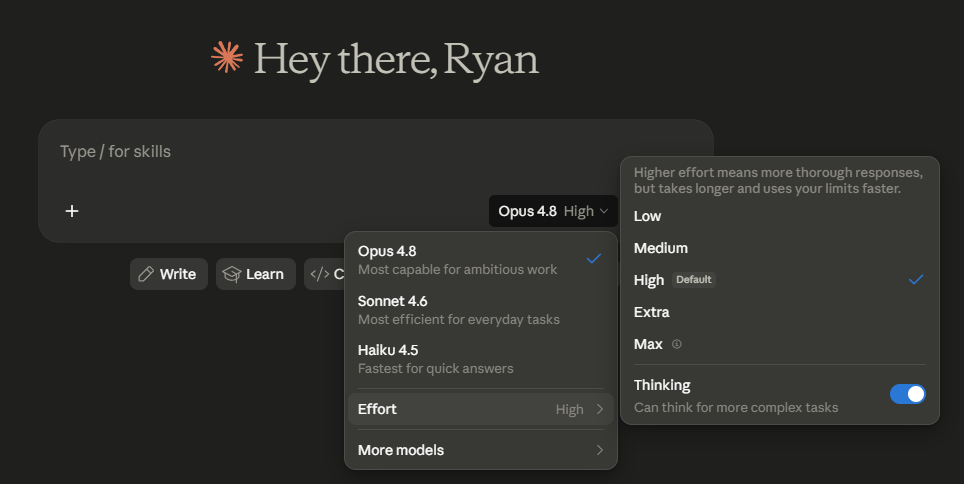
It lives right next to the model picker in the Claude app and in Cowork. Think of it as how hard you want Claude to think before it answers.
Crank it up when the problem is genuinely hard and you want it to chew on the thing. Drop it down when the task is obvious and you just want the answer.
Note that it’s set at a “high” default. If you are using Claude for simple tasks, you may want to lower this to lower costs.
The bigger context window: long documents finally stay in memory
Claude 4.8 can now hold a massive amount of text at once. A full year of meeting notes. A 300-page report. An entire manuscript or your whole newsletter archive.
All in one go.
The kind of thing where you used to paste it in and watch Claude forget the beginning by the time it reached the end.
If you work with long documents, this is the change you’ll feel. Drop the whole thing in. Ask your questions. It remembers what was on page 4 when you’re asking about page 280.
Fast mode: pay more, wait less
Small one, but worth knowing.
There’s now a fast mode that cranks the speed up about 2.5x. You pay a premium for it. Pay more, wait less.
Most people won’t need it. But if you’re ever watching the cursor blink while a deadline breathes down your neck, the option’s there.
Dynamic workflows (skip this section if you don’t code)
Anthropic also shipped a thing called dynamic workflows. It lets Claude run a huge number of helper agents at once on giant coding jobs inside Claude Code.
If that sentence meant nothing to you, good. It doesn’t apply to you.
Move on with a clear conscience.
So should you care about Claude Opus 4.8?
A little.
Switch to Claude 4.8. It’s free, same price as Claude 4.7, and it’s better at the stuff that frustrates you most.
Play with the effort dial. It’s the one new toggle you’ll use.
And if you ever work with big documents, this is the upgrade that quietly makes your week easier.
That’s the honest read. Not a revolution. Just a model that lies less, wastes less of your time, and forgets less of what you give it.
Which, when you’ve spent the last year fighting all three of those, is more than enough reason to flip the switch.
Common Questions About Claude Opus 4.8
Is Claude Opus 4.8 worth switching to from Claude 4.7? Yes, for most people. It’s the same price, available in the same places, and the changes (less hallucination, the effort dial, the bigger context window) hit the parts of using Claude that annoy you most. There’s no reason to stay on 4.7 unless you’ve built something that depends on its specific behavior.
Does Claude 4.8 cost more than Claude 4.7? No. Same pricing tier. The only thing that costs extra is the new fast mode, which is optional and runs about 2.5x faster for a premium.
What is the effort dial in Claude 4.8? A new toggle next to the model picker in the Claude app and in Cowork. It controls how hard Claude thinks before answering. High effort for complex problems. Low effort for simple tasks where you just want the answer. The default setting reports are mixed, so open your own dropdown and check.
Does Claude 4.8 still hallucinate? Yes. Every large language model still hallucinates. Anthropic trained 4.8 to flag uncertainty and fabricate less, and early testers say the change is real. But you should still verify anything that matters before you use it. The improvement is that 4.8 is more likely to admit when it doesn’t know.
How big is Claude 4.8’s context window? Big enough to hold a 300-page report, a year of meeting notes, or a full manuscript in a single prompt without losing the beginning. If you work with long documents, this is the upgrade you’ll feel first.
What are dynamic workflows in Claude 4.8 and do I need them? Dynamic workflows let Claude run many helper agents in parallel inside Claude Code on large coding jobs. If you don’t write code, you can ignore this entirely. It doesn’t show up in the regular Claude app or in Cowork for non-coding work.
Where can I use Claude Opus 4.8? The same places you used 4.7: the Claude app, Claude Code, and Cowork. Switch the model in the picker and you’re on it.
About the author
Ryan Stax writes The AI Handbook, a Substack newsletter for solo content creators and newsletter writers who want to use AI in their work instead of just reading about it. He’s the founder of deploi.co and has been building with Claude since its early releases.
Related reading: Claude Managed Agents: What You Need to Know, the honest breakdown of the last Claude release worth reading. Also worth a read: How to Use Claude Cowork Better Than 99% of People, the complete 10-minute setup for the surface where the new effort dial lives.
Simplifies things tremendously. Thanks!