
How I Use Two Free AI Tools to Learn Everything 10x Faster
And the 4-phase workflow you can run in 45 minutes

I’ve been using AI daily for over two years. Exposed to almost every tool, every workflow, every hyped technique the timeline throws at me.
And yet last month, I couldn’t remember a single concrete insight from multiple days “AI-assisted research.”
Not one.
I had the chat logs to prove I’d done the work. Hours of conversations with Claude about AI agents, workflow automation, industry trends. I even had notes. But when I sat down to actually WRITE the newsletter issue, I was starting from scratch. Couldn’t recall the key points. Had to re-read everything.
This was embarrassing. I literally write a newsletter about AI systems.
Then I remembered something from my intelligence days. Twenty years in that world, and the best analysts I worked with never just consumed information. They had a specific method for turning raw data into knowledge they could retrieve under pressure.
Briefings, interrogations, split-second decisions. They trained themselves to WORK with information, not collect it.
I’d been ignoring that lesson for two years of AI use.
Two free AI tools can replicate that entire analyst workflow in about 45 minutes.
The Two-Engine System
Engine 1: Gemini Deep Research (Discovery) Your reconnaissance asset. Scans dozens of sources in minutes. Builds a dossier on any topic.
Engine 2: NotebookLM (Synthesis) Your analytical asset. Turns raw research into something you can actually recall three weeks later when you need it.
Used separately, they’re good. Used together in sequence, you’re godly unstoppable.
Phase 1: The Discovery Protocol
A weak prompt gets you a weak report.
Think like an intelligence officer tasking a collection asset. Be SPECIFIC about:
The lens (what perspective to analyze from)
The criteria (how to evaluate what matters)
The output format (how you need the intel packaged)
The Prompt Template I Use:
Role: Act as a Senior [Your Job Title].

Task: Conduct a Deep Research project on [Your Topic].

Rubric: Evaluate all findings based on:
- [Criterion 1]
- [Criterion 2]
- [Criterion 3]
- [Criterion 4]

Constraint: Prioritize high-authority sources. For every distinct claim, provide an inline citation.

CRITICAL: At the end of the report, create a section titled 'Reference List' that includes the full, raw URL (non-hyperlinked text) for every source used.
That last part matters more than you think. We’ll come back to it.
Real Example:
Role: Act as a Senior Business Strategist.

Task: Conduct a Deep Research project on AI-powered customer onboarding systems.

Rubric: Evaluate all findings based on:
- Implementation complexity
- Cost structure
- Measurable ROI examples
- Integration requirements with existing CRMs

Constraint: Prioritize high-authority sources. For every distinct claim, provide an inline citation.

CRITICAL: At the end, create a 'Reference List' with full raw URLs for every source.
Monitor the Thinking Loop
Once you hit enter, Gemini starts its iterative research process. Open the “Show Thinking” toggle and WATCH it work.
If you see it drifting off-target (searching the wrong angle, misinterpreting your intent), interrupt and course-correct immediately. Saves you from getting a 2,000-word report that answers the wrong question.
Go Deeper When Needed
First pass often comes back thin in certain areas. Don’t settle.
Use a follow-up prompt:
"The implementation section is solid, but the ROI analysis is thin. Perform a second Deep Research pass specifically on documented case studies with measurable outcomes and add that data to the report."Layer depth where you need it.
Phase 2: The Transfer Protocol
This step breaks the whole system if you rush it.
Copy-paste from Gemini into NotebookLM and you lose all the citation links. Your notebook can’t trace anything back to source. Useless for serious work.
Two Methods:
Method A (Standard): Use “Export to Docs.” Because you included that raw URL reference list in your prompt, NotebookLM can parse those links even when hyperlinks break.
Method B (Power User): Export as PDF first. NotebookLM handles PDFs better for preserving structure, page breaks, and section organization.
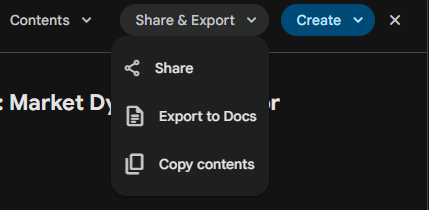
I use Method B for anything I plan to reference long-term.
Phase 3: Building Your Knowledge Library
Now you’re in NotebookLM.
Build a Hybrid Source Stack
Don’t just upload the Gemini report. Use it as a MAP, then add the TERRITORY.
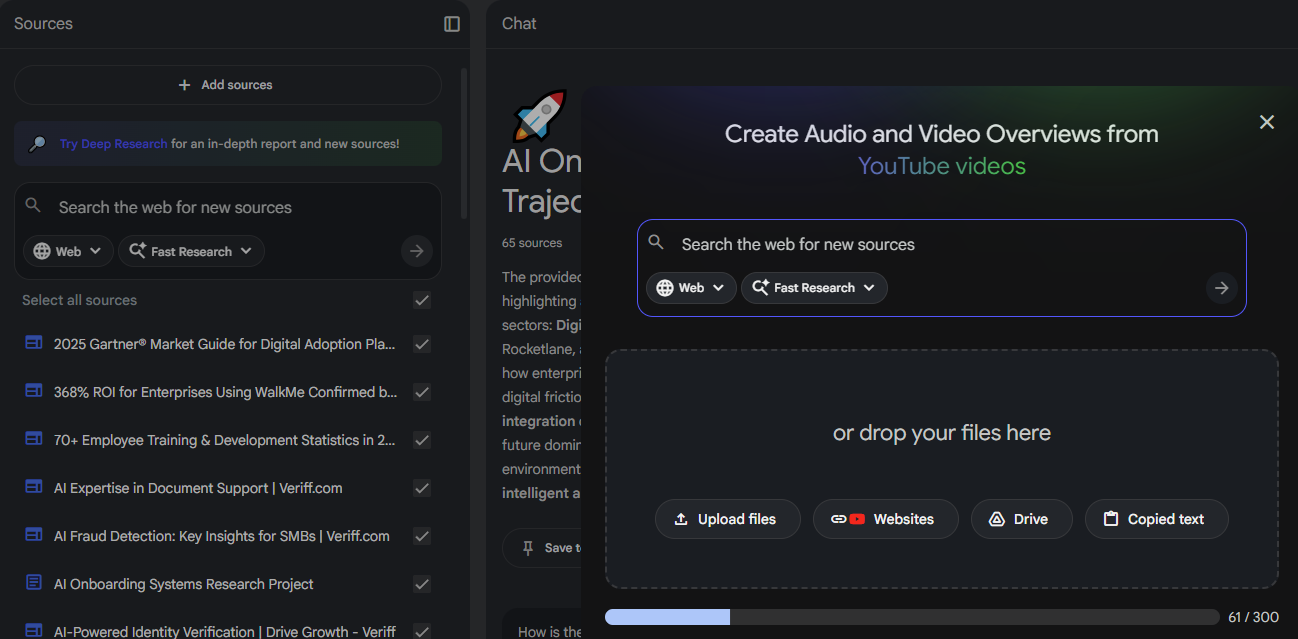
Layer 1: Upload your Gemini report (the narrative overview)
Layer 2: Add primary sources Take 3-5 of the most important URLs from that reference list and upload the actual PDFs or documents. Cross-reference the summary against raw source material.
Layer 3: Add multimedia Paste links to relevant YouTube videos, podcast episodes, or expert interviews. NotebookLM transcribes and analyzes them alongside everything else.
Phase 4: Active Interrogation
Reading something once and hoping it sticks? Wishful thinking.
The research is clear: testing yourself on material beats re-reading it every single time. NotebookLM lets you do this at scale.
The Studio Panel
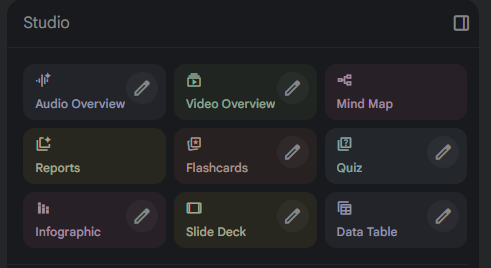
NotebookLM has a full suite of learning aids built in. Once your sources are loaded, you can generate:
Audio Overview: Two AI hosts discuss your material like a podcast
Video Overview: Visual walkthrough of key concepts
Mind Map: Visual connections between ideas
Flashcards: Quiz yourself on key terms and concepts
Quiz: Multiple choice and short answer from your sources
Reports: Structured summaries in different formats
Slide Deck: Presentation-ready breakdown
Data Table: Extract structured information
Pick the format that matches how you learn. I use Audio Overview for initial exposure, then Flashcards and Quiz to lock it in.
Generate an Audio Overview First
Before you read anything, generate an Audio Overview. Creates a mental map before you encounter the details.
it’s as simple as clicking “Audio Overview” give it a few minutes to think.
The Socratic Loop
While listening, use the interactive feature to INTERRUPT the AI hosts.
When something catches your attention, ask:
“Wait, what specific tools can do that right now?”
“How does that compare to the traditional approach?”
“What’s the biggest risk with that method?”
The AI pauses its script and synthesizes an answer from YOUR sources. Not from training data that might be two years out of date. From the actual documents and videos you uploaded.
Deep Prompting for Expertise
Once you’ve listened, use text prompts to stress-test what you’ve learned.
My favorite technique:
"Based on the uploaded sources, construct a debate between two experts. Expert A supports the main conclusion. Expert B attacks the methodology. What specific evidence from the text would each use?"What This Actually Gets You
Speed: Days of manual research compressed to 30-45 minutes.
Depth: Layered understanding with primary sources, not skimmed summaries.
Retention: I stopped re-reading my own research notes. The information was just... there when I needed it.
Traceability: Every claim links back to source. When you need to reference something later, you can actually find it.
Your Move
Pick one topic you’ve been meaning to research. Run it through this protocol this week.
Start with Gemini Deep Research using the role-based prompt template. Export with citations intact. Build your source stack in NotebookLM. Generate the audio overview. Interrogate it.
Then hit reply and tell me what you learned.
I read every response.
Build systems. Remove friction. Execute.
— Ryan
P.S. If this landed for you, forward it to someone drowning in browser tabs who never seems to retain what they read.
Love this! I do something similar with ChatGPT, Perplexity, Claude and Notion. Research. Document. Analyze. Summarize. Simplify. Rinse and Repeat.
I do listen to my summaries via voice on ChatGPT but Gemini and NotebookLM are going to be placed in rotation.
Solid article!
Wow, this is wild. Guess I need to get NotebookLM now 😂